> ## Documentation Index
> Fetch the complete documentation index at: https://docs.rapydo.io/llms.txt
> Use this file to discover all available pages before exploring further.
# License
# License
View and manage your Rapydo license.
## Overview
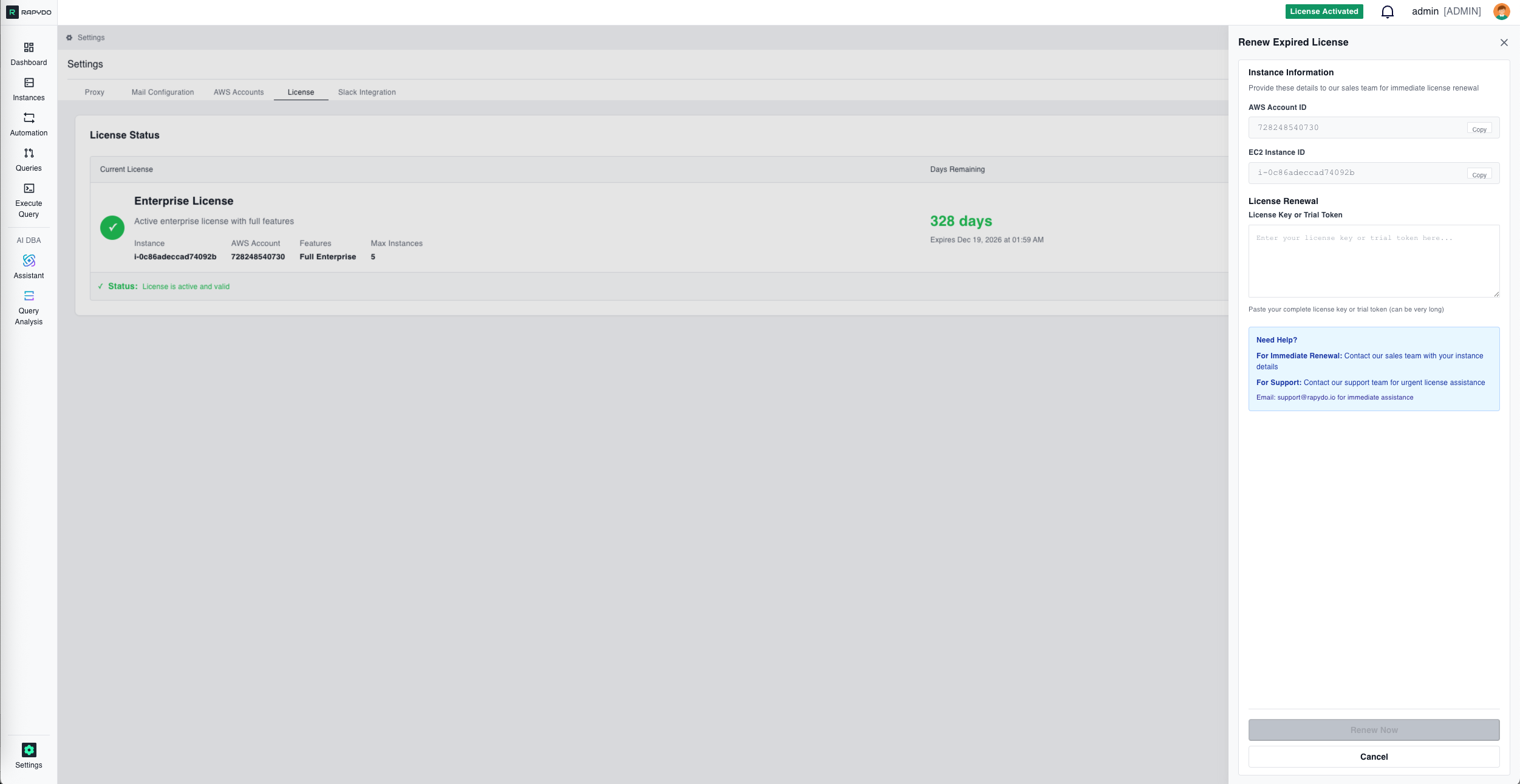 The License tab displays your current license status and allows you to activate or renew your Rapydo license.
## License Status
The License Status section displays a table with three columns:
| Column | What It Shows |
| ------------------- | -------------------------------------------------------------------------------------------------------------------------------------- |
| **Current License** | License type (e.g., Enterprise License, Trial License), status message, EC2 Instance ID, AWS Account, Features tier, and Max Instances |
| **Days Remaining** | Number of days until expiration and the expiration date (shown as "Expires \[date]") |
| **Actions** | **Activate** button to renew or apply a new license |
## License Renewal
The License tab displays your current license status and allows you to activate or renew your Rapydo license.
## License Status
The License Status section displays a table with three columns:
| Column | What It Shows |
| ------------------- | -------------------------------------------------------------------------------------------------------------------------------------- |
| **Current License** | License type (e.g., Enterprise License, Trial License), status message, EC2 Instance ID, AWS Account, Features tier, and Max Instances |
| **Days Remaining** | Number of days until expiration and the expiration date (shown as "Expires \[date]") |
| **Actions** | **Activate** button to renew or apply a new license |
## License Renewal
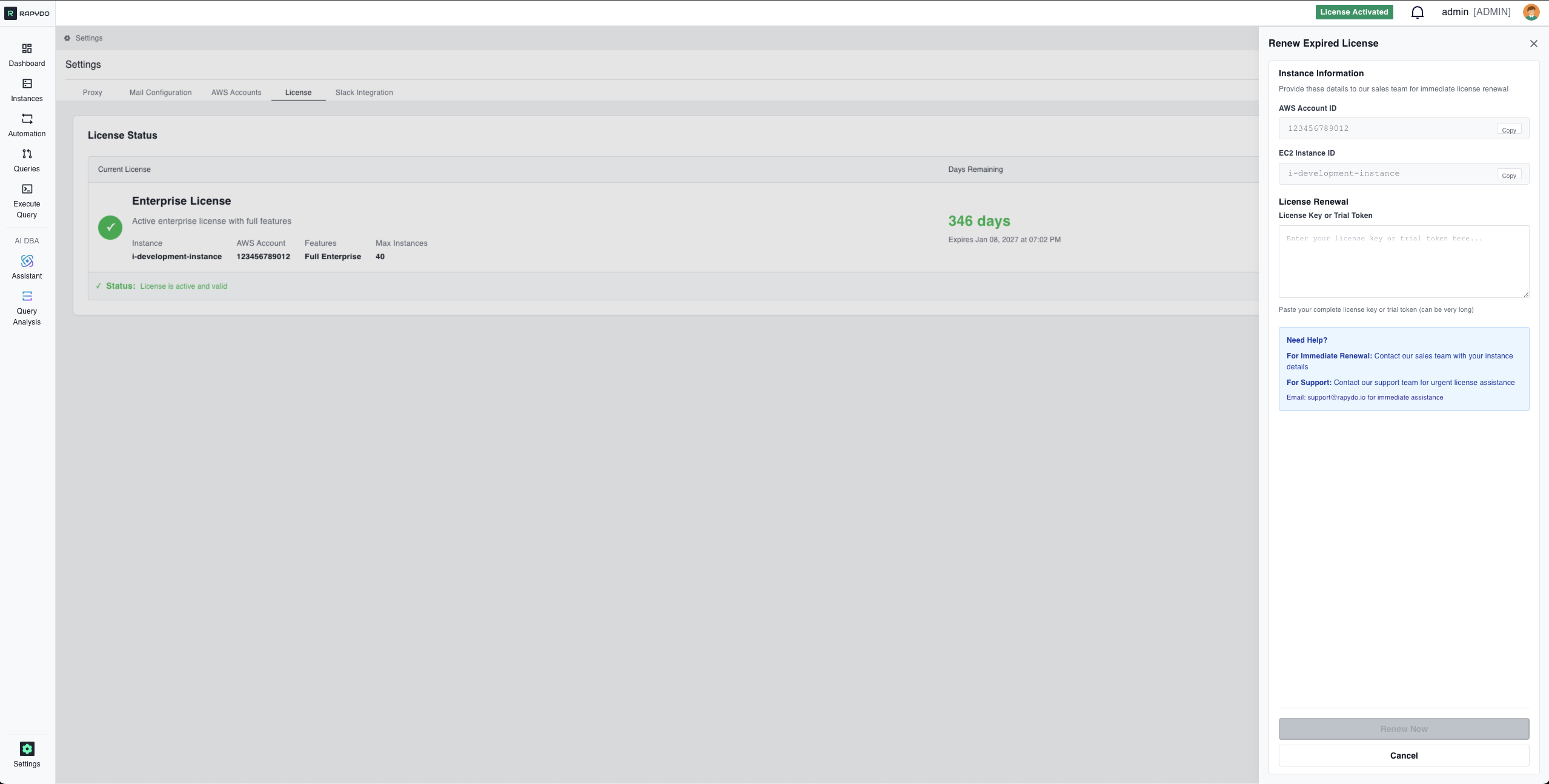 Click **Activate** to renew an expiring license or apply a new license key.
### Instance Information
The renewal form displays your instance details for easy reference when contacting sales:
Your 12-digit AWS account number. Click **Copy** to copy it to your clipboard.
The instance ID tied to your license. Click **Copy** to copy it to your clipboard.
Provide these details to the sales team when requesting a license renewal.
### Applying a License
Paste your complete license key or trial token in the text area. License keys can be very long.
Click **Renew Now** to apply the license or **Cancel** to close.
## Getting Help
For immediate renewal, contact the sales team with your instance details (AWS Account ID and EC2 Instance ID).
For urgent license assistance, email **[support@rapydo.io](mailto:support@rapydo.io)**
Click **Activate** to renew an expiring license or apply a new license key.
### Instance Information
The renewal form displays your instance details for easy reference when contacting sales:
Your 12-digit AWS account number. Click **Copy** to copy it to your clipboard.
The instance ID tied to your license. Click **Copy** to copy it to your clipboard.
Provide these details to the sales team when requesting a license renewal.
### Applying a License
Paste your complete license key or trial token in the text area. License keys can be very long.
Click **Renew Now** to apply the license or **Cancel** to close.
## Getting Help
For immediate renewal, contact the sales team with your instance details (AWS Account ID and EC2 Instance ID).
For urgent license assistance, email **[support@rapydo.io](mailto:support@rapydo.io)**