> ## Documentation Index
> Fetch the complete documentation index at: https://docs.rapydo.io/llms.txt
> Use this file to discover all available pages before exploring further.
# Scout Rules - Triggers and Actions
> Complete reference for Scout Rules configuration
## Overview
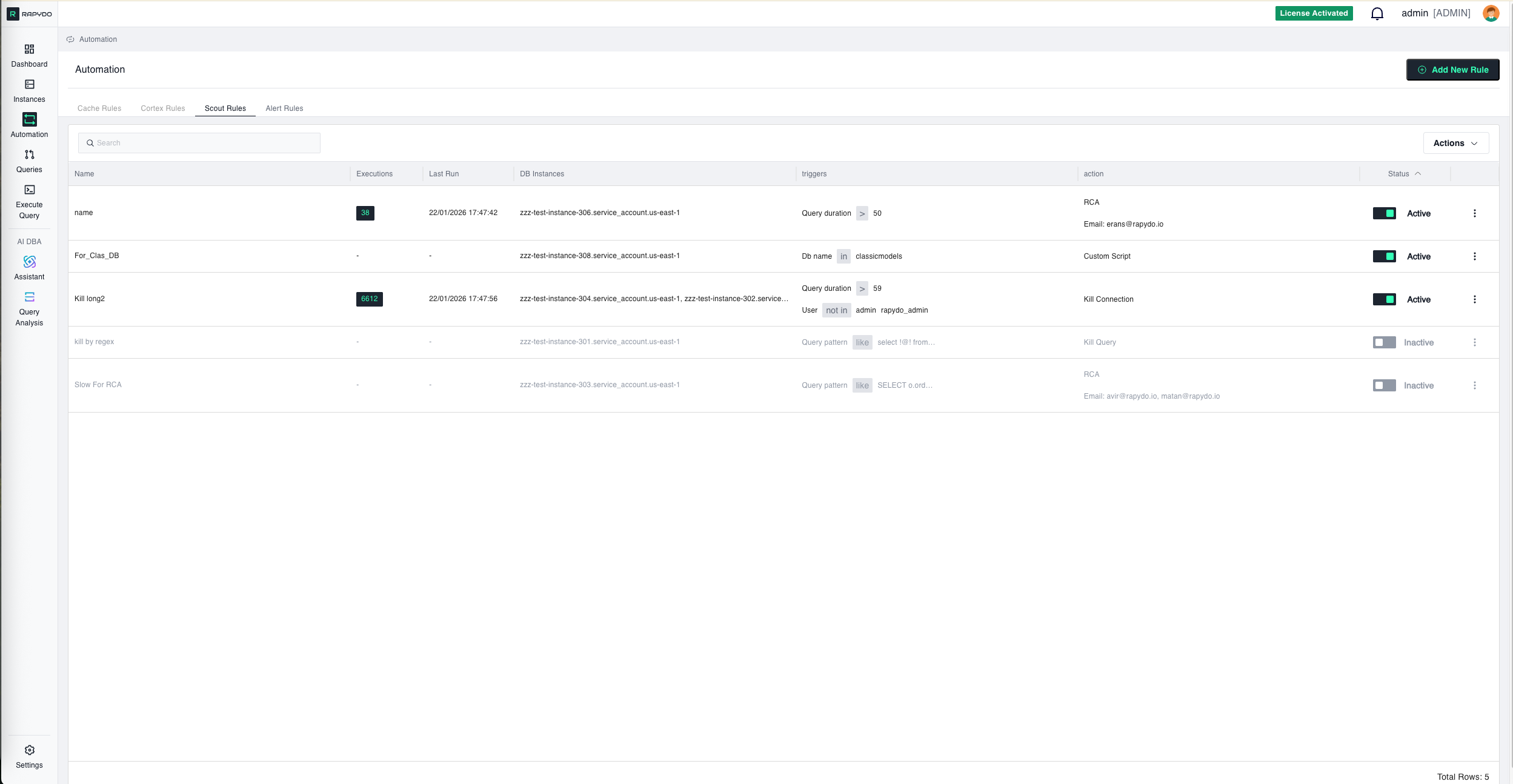 Scout Rules monitor long-running queries and database activity in real-time, automatically responding to performance issues. This guide covers all available triggers, actions, and configuration options for Scout Rules.
***
## Rule Setup Flow
### **1. DB Instances** (Required First Step)
Select which database instances this rule will monitor.
**Interface:** Dropdown with checkboxes
* **Select All**: Choose all available instances at once
* **Individual Selection**: Pick specific instances
**Important:** Your selection here determines what databases and users appear in trigger dropdowns later.
***
## **2. Triggers** (Up to 3 Maximum)
Configure conditions that will activate your rule. All triggers use **AND** logic—ALL must be true simultaneously for the rule to trigger.
***
### **Query Duration**
Monitors how long queries have been running.
**Operator Options:**
* **Greater Than**: Trigger when runtime exceeds duration
* **Less Than**: Trigger when runtime is below duration
**Value:** Enter time in seconds
**Example:** Greater Than 30 = Trigger for queries running longer than 30 seconds
**Use Cases:**
* Stop runaway queries that slow the database
* Enforce query timeout policies
* Protect database performance from inefficient queries
* Prevent resource exhaustion from long-running reports
***
### **Connection Idle Time**
Monitors connections in "sleep" state (connected but not executing queries).
**Operator Options:**
* **Greater Than**: Trigger when idle time exceeds value
* **Less Than**: Trigger when idle time is below value
**Value:** Enter time in seconds
**Example:** Greater Than 600 = Trigger for connections idle over 10 minutes
**Use Cases:**
* Free up memory from abandoned connections
* Prevent connection pool exhaustion
* Clean up development/test connections left open
* Reclaim resources from inactive sessions
***
### **Connection Utilization**
Monitors database connection pool usage as percentage (%) of maximum connections.
**Operator Options:**
* **Greater Than**: Trigger when usage exceeds percentage
* **Less Than**: Trigger when usage falls below percentage
**Value:** Enter percentage (0-100)
**Example:** Greater Than 80 = Trigger when 80% of connection pool is in use
**Use Cases:**
* Prevent "too many connections" errors
* Proactive connection pool management
* Emergency connection cleanup during high load
* Kill idle connections when pool approaches capacity
***
### **Query Pattern**
Matches running queries against patterns using SQL LIKE syntax with `%` wildcards.
**Interface:** Manual text entry
**Pattern Behavior:**
* The system is **case-insensitive** and **automatically removes semicolons** before matching
* Use **%** wildcard to represent any content: `select % from table_name`
* Patterns must match query structure exactly (except case and semicolons)
* **⚠️ Critical**: Pattern matching is **sensitive to spacing and line breaks**—extra spaces or different formatting will cause pattern mismatches
**Operator Options:**
* **Like**: Trigger when queries match the pattern
* **Not Like**: Trigger when queries don't match the pattern
**Value:** Enter SQL patterns using `%` wildcards
***
#### **Simple Pattern Examples**
**Security - Detect Destructive Operations:**
```sql theme={null}
Pattern: %DROP TABLE%
Result: Triggers the configured action (e.g., Kill Query) for any query attempting to drop tables
```
**Performance - Detect Queries Without LIMIT:**
```sql theme={null}
Pattern (Not Like): %LIMIT%
Result: Triggers the configured action (e.g., Kill Query) for SELECT queries missing pagination
```
**Compliance - Monitor Sensitive Data Access:**
```sql theme={null}
Pattern: %SELECT * FROM salary%
Result: Triggers the configured action (e.g., No action + notification) when the salary table is queried
```
***
#### **Complex Pattern Examples**
**Example 1: Simple Query with Wildcards**
**Your rule query pattern:**
```sql theme={null}
SELECT e.lastName, e.firstName, p.amount, pg_sleep(%)
FROM employees e
JOIN customers c ON e.employeeNumber = c.salesRepEmployeeNumber
JOIN payments p ON c.customerNumber = p.customerNumber
WHERE p.amount < 1000
LIMIT 1;
```
**✅ This WILL match (case variations):**
```sql theme={null}
select e.lastname, e.firstname, p.amount, pg_sleep(10)
from employees e
join customers c on e.employeenumber = c.salesrepemployeenumber
join payments p on c.customernumber = p.customernumber
where p.amount < 1000
limit 1;
```
**❌ This will NOT match (extra spaces):**
```sql theme={null}
SELECT e.lastName, e.firstName , p.amount, pg_sleep(10)
FROM employees e JOIN customers c ON e.employeeNumber = c.salesRepEmployeeNumber
JOIN payments p ON c.customerNumber = p.customerNumber
WHERE p.amount < 1000 LIMIT 1;
```
**❌ This will NOT match (different line breaks):**
```sql theme={null}
select e.lastname, e.firstname, p.amount, pg_sleep(10) from employees e
join customers c on e.employeenumber = c.salesrepemployeenumber
join payments p on c.customernumber = p.customernumber where p.amount < 1000 limit 1;
```
***
**Example 2: Multi-line Query with Multiple Wildcards**
**Original Query:**
```sql theme={null}
-- Customer order analysis query
SELECT
c.[customer_id],
c.[first_name] + ' ' + c.[last_name] AS [full_name],
cat.[category_name],
p.[product_name],
p.[price],
oi.[quantity],
(oi.[quantity] * p.[price]) AS [line_total],
o.[order_date],
r.[rating],
r.[review_text],
CASE
WHEN r.[rating] >= 4 THEN 'Positive'
WHEN r.[rating] = 3 THEN 'Neutral'
ELSE 'Negative'
END AS [review_sentiment]
FROM [customers] c
INNER JOIN [orders] o ON c.[customer_id] = o.[customer_id]
INNER JOIN [order_items] oi ON o.[order_id] = oi.[order_id]
INNER JOIN [products] p ON oi.[product_id] = p.[product_id]
LEFT JOIN [categories] cat ON p.[category_id] = cat.[category_id]
LEFT JOIN [reviews] r ON p.[product_id] = r.[product_id]
AND c.[customer_id] = r.[customer_id]
WHERE o.[order_date] >= '2023-01-01'
AND p.[price] > 50.00
AND c.[country] IN ('USA', 'Canada', 'UK')
```
**Rule Pattern (flexible matching on dates, prices, countries):**
```sql theme={null}
-- Customer order analysis query
SELECT
c.[customer_id],
c.[first_name] + ' ' + c.[last_name] AS [full_name],
cat.[category_name],
p.[product_name],
p.[price],
oi.[quantity],
(oi.[quantity] * p.[price]) AS [line_total],
o.[order_date],
r.[rating],
r.[review_text],
CASE
WHEN r.[rating] >= 4 THEN 'Positive'
WHEN r.[rating] = 3 THEN 'Neutral'
ELSE 'Negative'
END AS [review_sentiment]
FROM [customers] c
INNER JOIN [orders] o ON c.[customer_id] = o.[customer_id]
INNER JOIN [order_items] oi ON o.[order_id] = oi.[order_id]
INNER JOIN [products] p ON oi.[product_id] = p.[product_id]
LEFT JOIN [categories] cat ON p.[category_id] = cat.[category_id]
LEFT JOIN [reviews] r ON p.[product_id] = r.[product_id]
AND c.[customer_id] = r.[customer_id]
WHERE o.[order_date] >= %
AND p.[price] > %
AND c.[country] IN (%)
```
**Key Points:**
* **Exact line break formatting** preserved between original and pattern
* **Multiple wildcards** (%) used for flexible matching on dates, prices, and countries
* **Comments preserved** to maintain exact structure
* **All spacing and indentation** must match exactly
**⚠️ Important:** If the original query has line breaks, the pattern must also have line breaks in the same places. A single-line pattern will NOT match a multi-line query, and vice versa.
***
#### **Best Practices for Query Patterns**
**Recommended Sources for Copy-Paste:**
Copy query text directly from these sources to ensure exact spacing and formatting:
* **Rapydo Query Workspace** (Process count history, Realtime queries, Query lists)
* **Rapydo Dashboard** (Longest Query widget)
* **Database Query Logs** (PostgreSQL pg\_stat\_statements, MySQL slow query log)
* **Application Logs** (if they capture full SQL statements)
* **Database Audit Trails**
**Why This Matters:** This ensures the **exact spacing, line breaks, and formatting** that will actually be executed, preventing pattern matching failures due to formatting differences.
***
**Pattern Matching Tips:**
✅ **Use wildcards liberally** for values that change: dates, IDs, amounts
✅ **Copy from actual query logs** rather than typing manually
✅ **Test your pattern** on a few real queries before deploying
✅ **Keep structural keywords exact** (SELECT, FROM, WHERE, JOIN)
❌ **Don't modify spacing** after copying—even small changes break matching
❌ **Don't reformat queries** for readability—match the actual format
***
### **DB Name**
Triggers based on which database is being accessed.
**Interface:** Dropdown (shows databases from selected instances only)
* **Search Function**: Find specific databases quickly
* **Select All**: Choose all databases in the dropdown
**Operator Options:**
* **In**: Trigger for activity on specified databases
* **Not In**: Trigger for activity NOT on specified databases
**Examples:**
* **Production protection**: In "production\_db" - Apply strict rules to production database
* **Development monitoring**: Not In "dev\_db, test\_db" - Monitor non-development access
* **Schema-specific rules**: In "analytics\_db" - Different rules for analytics workload
***
### **User**
Triggers based on which database user is running processes.
**Interface:** Dropdown (shows users from selected instances only)
* **Search Function**: Find specific users quickly
* **Select All**: Choose all users in the dropdown
* **Shared Indicators**: Shows users that exist across multiple instances
**Operator Options:**
* **In**: Trigger for processes from specified users
* **Not In**: Trigger for processes NOT from specified users
**Examples:**
* **Admin monitoring**: In "admin, dba, root" - Enhanced monitoring for privileged users
* **Service account limits**: In "app\_user, backup\_user" - Control service account query duration
* **Developer restrictions**: Not In "prod\_app\_user" - Apply rules to everyone except production app
***
### **IP Address**
Triggers based on source IP address of database connections.
**Interface:** Manual text entry
**Format:**
* Single IP: `192.168.1.100`
* Multiple IPs: Comma-separated, no spaces: `192.168.1.100,10.0.0.5`
* CIDR notation: `10.0.0.0/8` or `203.0.113.0/24`
**Operator Options:**
* **In**: Trigger for processes from specified IPs
* **Not In**: Trigger for processes NOT from specified IPs
**Examples:**
* **Security monitoring**: In "203.0.113.45" - Watch specific suspicious IP
* **External access**: Not In "10.0.0.0/8" - Monitor connections from outside internal network
* **Office restriction**: In "203.0.113.0/24" - Limit long queries to office network only
* **Cloud environment**: Not In "172.16.0.0/12" - Monitor non-VPC connections
***
### **Custom Script**
Advanced trigger that executes a custom SQL query. If the query returns any data (one or more rows), the rule is considered "triggered" and the associated action will be executed.
**Interface:** Manual text entry (SQL editor)
**How It Works:**
* You write a SQL query that checks for a specific condition
* Query runs periodically against RapydoDB (monitoring database)
* If query returns results (rows), trigger activates
* If query returns no results (empty), trigger does not activate
**Value:** Enter SQL query that returns data when condition is met
**Action Restrictions:**
When a Custom Script trigger is used, only the following actions are available:
* Kill Query
* Kill Connection
* No action (with notification)
* Custom Script (action)
**Use Cases:**
* **Complex business rules**: Combine multiple conditions beyond standard triggers
* **Time-based rules**: "Kill queries running during business hours (9am-5pm)"
* **Custom thresholds**: "Kill queries when combined CPU + Memory exceeds 150%"
* **External integration**: Query external monitoring tables
* **Advanced patterns**: "Kill queries with more than 3 joins AND no index usage"
**Example - Time-Based Kill:**
```sql theme={null}
SELECT query_id
FROM rapydo_queries
WHERE query_duration > 300
AND HOUR(NOW()) BETWEEN 9 AND 17;
```
Result: Returns query IDs for queries running longer than 5 minutes during business hours
***
## **3. Actions**
Scout Rules monitor long-running queries and database activity in real-time, automatically responding to performance issues. This guide covers all available triggers, actions, and configuration options for Scout Rules.
***
## Rule Setup Flow
### **1. DB Instances** (Required First Step)
Select which database instances this rule will monitor.
**Interface:** Dropdown with checkboxes
* **Select All**: Choose all available instances at once
* **Individual Selection**: Pick specific instances
**Important:** Your selection here determines what databases and users appear in trigger dropdowns later.
***
## **2. Triggers** (Up to 3 Maximum)
Configure conditions that will activate your rule. All triggers use **AND** logic—ALL must be true simultaneously for the rule to trigger.
***
### **Query Duration**
Monitors how long queries have been running.
**Operator Options:**
* **Greater Than**: Trigger when runtime exceeds duration
* **Less Than**: Trigger when runtime is below duration
**Value:** Enter time in seconds
**Example:** Greater Than 30 = Trigger for queries running longer than 30 seconds
**Use Cases:**
* Stop runaway queries that slow the database
* Enforce query timeout policies
* Protect database performance from inefficient queries
* Prevent resource exhaustion from long-running reports
***
### **Connection Idle Time**
Monitors connections in "sleep" state (connected but not executing queries).
**Operator Options:**
* **Greater Than**: Trigger when idle time exceeds value
* **Less Than**: Trigger when idle time is below value
**Value:** Enter time in seconds
**Example:** Greater Than 600 = Trigger for connections idle over 10 minutes
**Use Cases:**
* Free up memory from abandoned connections
* Prevent connection pool exhaustion
* Clean up development/test connections left open
* Reclaim resources from inactive sessions
***
### **Connection Utilization**
Monitors database connection pool usage as percentage (%) of maximum connections.
**Operator Options:**
* **Greater Than**: Trigger when usage exceeds percentage
* **Less Than**: Trigger when usage falls below percentage
**Value:** Enter percentage (0-100)
**Example:** Greater Than 80 = Trigger when 80% of connection pool is in use
**Use Cases:**
* Prevent "too many connections" errors
* Proactive connection pool management
* Emergency connection cleanup during high load
* Kill idle connections when pool approaches capacity
***
### **Query Pattern**
Matches running queries against patterns using SQL LIKE syntax with `%` wildcards.
**Interface:** Manual text entry
**Pattern Behavior:**
* The system is **case-insensitive** and **automatically removes semicolons** before matching
* Use **%** wildcard to represent any content: `select % from table_name`
* Patterns must match query structure exactly (except case and semicolons)
* **⚠️ Critical**: Pattern matching is **sensitive to spacing and line breaks**—extra spaces or different formatting will cause pattern mismatches
**Operator Options:**
* **Like**: Trigger when queries match the pattern
* **Not Like**: Trigger when queries don't match the pattern
**Value:** Enter SQL patterns using `%` wildcards
***
#### **Simple Pattern Examples**
**Security - Detect Destructive Operations:**
```sql theme={null}
Pattern: %DROP TABLE%
Result: Triggers the configured action (e.g., Kill Query) for any query attempting to drop tables
```
**Performance - Detect Queries Without LIMIT:**
```sql theme={null}
Pattern (Not Like): %LIMIT%
Result: Triggers the configured action (e.g., Kill Query) for SELECT queries missing pagination
```
**Compliance - Monitor Sensitive Data Access:**
```sql theme={null}
Pattern: %SELECT * FROM salary%
Result: Triggers the configured action (e.g., No action + notification) when the salary table is queried
```
***
#### **Complex Pattern Examples**
**Example 1: Simple Query with Wildcards**
**Your rule query pattern:**
```sql theme={null}
SELECT e.lastName, e.firstName, p.amount, pg_sleep(%)
FROM employees e
JOIN customers c ON e.employeeNumber = c.salesRepEmployeeNumber
JOIN payments p ON c.customerNumber = p.customerNumber
WHERE p.amount < 1000
LIMIT 1;
```
**✅ This WILL match (case variations):**
```sql theme={null}
select e.lastname, e.firstname, p.amount, pg_sleep(10)
from employees e
join customers c on e.employeenumber = c.salesrepemployeenumber
join payments p on c.customernumber = p.customernumber
where p.amount < 1000
limit 1;
```
**❌ This will NOT match (extra spaces):**
```sql theme={null}
SELECT e.lastName, e.firstName , p.amount, pg_sleep(10)
FROM employees e JOIN customers c ON e.employeeNumber = c.salesRepEmployeeNumber
JOIN payments p ON c.customerNumber = p.customerNumber
WHERE p.amount < 1000 LIMIT 1;
```
**❌ This will NOT match (different line breaks):**
```sql theme={null}
select e.lastname, e.firstname, p.amount, pg_sleep(10) from employees e
join customers c on e.employeenumber = c.salesrepemployeenumber
join payments p on c.customernumber = p.customernumber where p.amount < 1000 limit 1;
```
***
**Example 2: Multi-line Query with Multiple Wildcards**
**Original Query:**
```sql theme={null}
-- Customer order analysis query
SELECT
c.[customer_id],
c.[first_name] + ' ' + c.[last_name] AS [full_name],
cat.[category_name],
p.[product_name],
p.[price],
oi.[quantity],
(oi.[quantity] * p.[price]) AS [line_total],
o.[order_date],
r.[rating],
r.[review_text],
CASE
WHEN r.[rating] >= 4 THEN 'Positive'
WHEN r.[rating] = 3 THEN 'Neutral'
ELSE 'Negative'
END AS [review_sentiment]
FROM [customers] c
INNER JOIN [orders] o ON c.[customer_id] = o.[customer_id]
INNER JOIN [order_items] oi ON o.[order_id] = oi.[order_id]
INNER JOIN [products] p ON oi.[product_id] = p.[product_id]
LEFT JOIN [categories] cat ON p.[category_id] = cat.[category_id]
LEFT JOIN [reviews] r ON p.[product_id] = r.[product_id]
AND c.[customer_id] = r.[customer_id]
WHERE o.[order_date] >= '2023-01-01'
AND p.[price] > 50.00
AND c.[country] IN ('USA', 'Canada', 'UK')
```
**Rule Pattern (flexible matching on dates, prices, countries):**
```sql theme={null}
-- Customer order analysis query
SELECT
c.[customer_id],
c.[first_name] + ' ' + c.[last_name] AS [full_name],
cat.[category_name],
p.[product_name],
p.[price],
oi.[quantity],
(oi.[quantity] * p.[price]) AS [line_total],
o.[order_date],
r.[rating],
r.[review_text],
CASE
WHEN r.[rating] >= 4 THEN 'Positive'
WHEN r.[rating] = 3 THEN 'Neutral'
ELSE 'Negative'
END AS [review_sentiment]
FROM [customers] c
INNER JOIN [orders] o ON c.[customer_id] = o.[customer_id]
INNER JOIN [order_items] oi ON o.[order_id] = oi.[order_id]
INNER JOIN [products] p ON oi.[product_id] = p.[product_id]
LEFT JOIN [categories] cat ON p.[category_id] = cat.[category_id]
LEFT JOIN [reviews] r ON p.[product_id] = r.[product_id]
AND c.[customer_id] = r.[customer_id]
WHERE o.[order_date] >= %
AND p.[price] > %
AND c.[country] IN (%)
```
**Key Points:**
* **Exact line break formatting** preserved between original and pattern
* **Multiple wildcards** (%) used for flexible matching on dates, prices, and countries
* **Comments preserved** to maintain exact structure
* **All spacing and indentation** must match exactly
**⚠️ Important:** If the original query has line breaks, the pattern must also have line breaks in the same places. A single-line pattern will NOT match a multi-line query, and vice versa.
***
#### **Best Practices for Query Patterns**
**Recommended Sources for Copy-Paste:**
Copy query text directly from these sources to ensure exact spacing and formatting:
* **Rapydo Query Workspace** (Process count history, Realtime queries, Query lists)
* **Rapydo Dashboard** (Longest Query widget)
* **Database Query Logs** (PostgreSQL pg\_stat\_statements, MySQL slow query log)
* **Application Logs** (if they capture full SQL statements)
* **Database Audit Trails**
**Why This Matters:** This ensures the **exact spacing, line breaks, and formatting** that will actually be executed, preventing pattern matching failures due to formatting differences.
***
**Pattern Matching Tips:**
✅ **Use wildcards liberally** for values that change: dates, IDs, amounts
✅ **Copy from actual query logs** rather than typing manually
✅ **Test your pattern** on a few real queries before deploying
✅ **Keep structural keywords exact** (SELECT, FROM, WHERE, JOIN)
❌ **Don't modify spacing** after copying—even small changes break matching
❌ **Don't reformat queries** for readability—match the actual format
***
### **DB Name**
Triggers based on which database is being accessed.
**Interface:** Dropdown (shows databases from selected instances only)
* **Search Function**: Find specific databases quickly
* **Select All**: Choose all databases in the dropdown
**Operator Options:**
* **In**: Trigger for activity on specified databases
* **Not In**: Trigger for activity NOT on specified databases
**Examples:**
* **Production protection**: In "production\_db" - Apply strict rules to production database
* **Development monitoring**: Not In "dev\_db, test\_db" - Monitor non-development access
* **Schema-specific rules**: In "analytics\_db" - Different rules for analytics workload
***
### **User**
Triggers based on which database user is running processes.
**Interface:** Dropdown (shows users from selected instances only)
* **Search Function**: Find specific users quickly
* **Select All**: Choose all users in the dropdown
* **Shared Indicators**: Shows users that exist across multiple instances
**Operator Options:**
* **In**: Trigger for processes from specified users
* **Not In**: Trigger for processes NOT from specified users
**Examples:**
* **Admin monitoring**: In "admin, dba, root" - Enhanced monitoring for privileged users
* **Service account limits**: In "app\_user, backup\_user" - Control service account query duration
* **Developer restrictions**: Not In "prod\_app\_user" - Apply rules to everyone except production app
***
### **IP Address**
Triggers based on source IP address of database connections.
**Interface:** Manual text entry
**Format:**
* Single IP: `192.168.1.100`
* Multiple IPs: Comma-separated, no spaces: `192.168.1.100,10.0.0.5`
* CIDR notation: `10.0.0.0/8` or `203.0.113.0/24`
**Operator Options:**
* **In**: Trigger for processes from specified IPs
* **Not In**: Trigger for processes NOT from specified IPs
**Examples:**
* **Security monitoring**: In "203.0.113.45" - Watch specific suspicious IP
* **External access**: Not In "10.0.0.0/8" - Monitor connections from outside internal network
* **Office restriction**: In "203.0.113.0/24" - Limit long queries to office network only
* **Cloud environment**: Not In "172.16.0.0/12" - Monitor non-VPC connections
***
### **Custom Script**
Advanced trigger that executes a custom SQL query. If the query returns any data (one or more rows), the rule is considered "triggered" and the associated action will be executed.
**Interface:** Manual text entry (SQL editor)
**How It Works:**
* You write a SQL query that checks for a specific condition
* Query runs periodically against RapydoDB (monitoring database)
* If query returns results (rows), trigger activates
* If query returns no results (empty), trigger does not activate
**Value:** Enter SQL query that returns data when condition is met
**Action Restrictions:**
When a Custom Script trigger is used, only the following actions are available:
* Kill Query
* Kill Connection
* No action (with notification)
* Custom Script (action)
**Use Cases:**
* **Complex business rules**: Combine multiple conditions beyond standard triggers
* **Time-based rules**: "Kill queries running during business hours (9am-5pm)"
* **Custom thresholds**: "Kill queries when combined CPU + Memory exceeds 150%"
* **External integration**: Query external monitoring tables
* **Advanced patterns**: "Kill queries with more than 3 joins AND no index usage"
**Example - Time-Based Kill:**
```sql theme={null}
SELECT query_id
FROM rapydo_queries
WHERE query_duration > 300
AND HOUR(NOW()) BETWEEN 9 AND 17;
```
Result: Returns query IDs for queries running longer than 5 minutes during business hours
***
## **3. Actions**
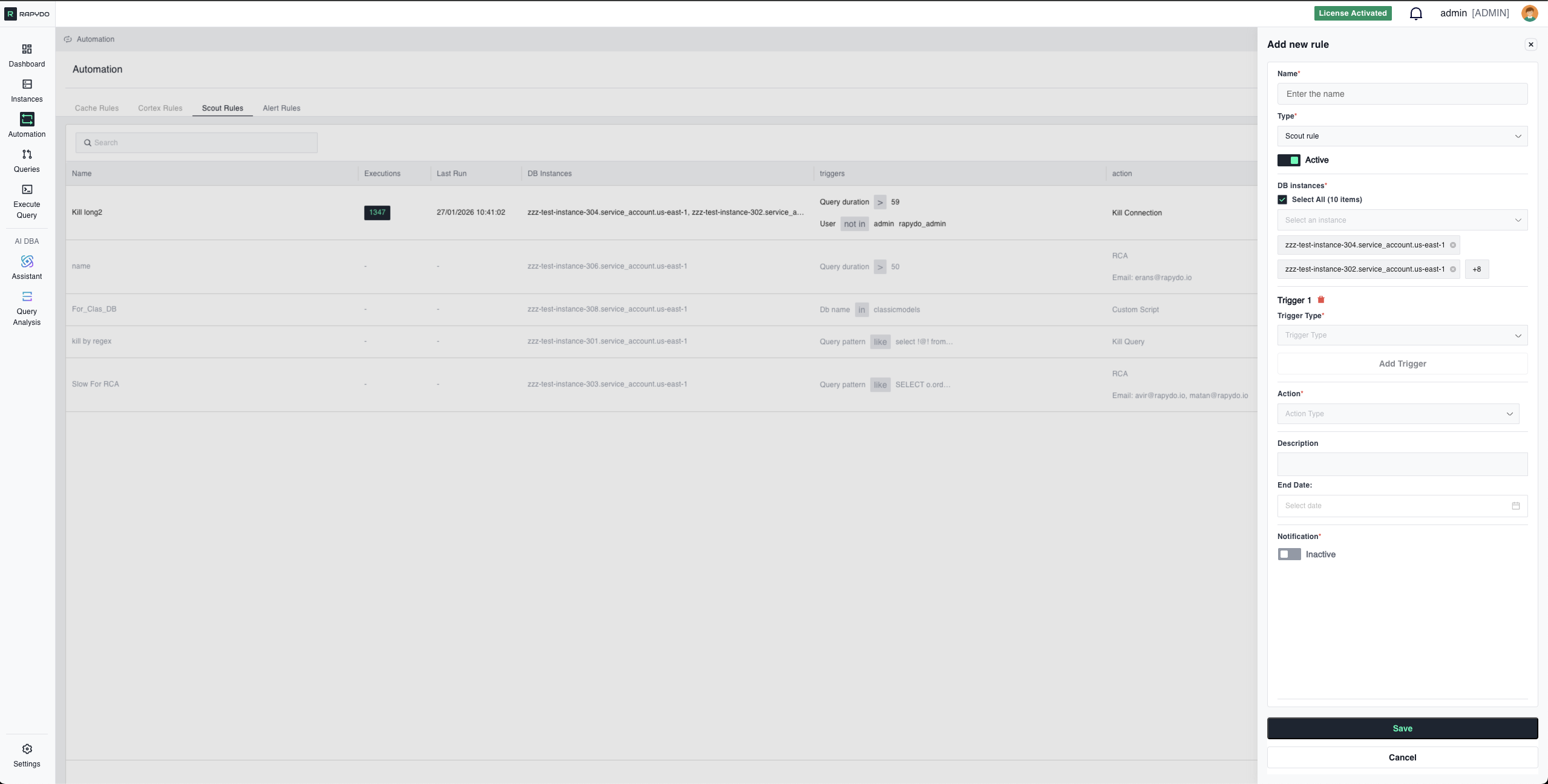 Choose what happens when trigger conditions are met. You can select **one action per rule**.
***
### **Kill Query**
Terminates only the running query while keeping the connection alive.
**How It Works:**
* PostgreSQL: Uses `pg_cancel_backend()`
* MySQL: Uses `CALL mysql.rds_kill_query()`
**Use When:**
* Query is slow but you don't want to disrupt the application connection
* Client can retry or handle the cancellation gracefully
* You want to stop the current operation without closing the session
**Example Scenario:**
```
Trigger: Query duration > 300 seconds
Action: Kill query
Result: The specific slow query is canceled, but the database
connection remains open for the application to use
```
***
### **Kill Connection**
Terminates the entire database connection (and all queries from that connection).
**How It Works:**
* PostgreSQL: Uses `pg_terminate_backend()`
* MySQL: Uses `CALL mysql.rds_kill()`
**Use When:**
* Connection itself is problematic (not just a single query)
* You need to forcibly disconnect a user or application
* Multiple queries from the same connection are causing issues
**Difference from Kill Query:**
* **Kill Query**: Stops the query, keeps connection → Less disruptive
* **Kill Connection**: Closes connection completely → More aggressive
**Example Scenario:**
```
Trigger: Connection idle time > 3600 seconds
Action: Kill connection
Result: Abandoned connection is closed, freeing resources
```
***
### **Kill Idle Connections**
Automatically terminates idle connections when connection utilization exceeds a threshold. Includes rate limiting to avoid killing too many connections at once.
**How It Works:**
* Monitors connection pool utilization
* When threshold is exceeded, identifies idle connections
* Kills idle connections up to the defined rate limit per cycle
* Continues over multiple cycles until utilization drops below threshold
**Use When:**
* Connection pool is approaching maximum capacity
* Many idle connections are consuming resources unnecessarily
* You need gradual cleanup without disrupting all idle sessions at once
**Configuration:**
| Field | Required | Description |
| --------- | -------- | ---------------------------------------------------- |
| **Value** | Yes | Maximum number of idle connections to kill per cycle |
* Typically paired with "Connection Utilization > 80%" trigger
* Rate limit prevents killing too many connections simultaneously
**Example Scenario:**
```
Trigger: Connection utilization > 80%
Action: Kill idle connections
Value: 10 (kill up to 10 idle connections per cycle)
Result: Idle connections are gradually terminated until pool
utilization drops below 80%
```
***
### **Rate Limit**
Limits the number of concurrent connections or operations matching the trigger criteria by automatically killing excess connections to reach the defined limit.
**How It Works:**
* You define a maximum number of allowed concurrent connections
* When more connections match your triggers, Rapydo counts them
* If count exceeds limit, Rapydo kills enough connections to reach the limit
* Example: Limit = 5, Current = 10 → Kills 5 connections
**Use When:**
* Need to enforce concurrent connection limits per user
* Want to prevent a single user/application from monopolizing resources
* Controlling resource usage for specific workloads (reporting, analytics)
**Important:** Rate limit controls the **NUMBER of simultaneous connections**, not queries per second or query frequency.
**Example Scenario:**
```
Triggers:
- User: In "reporting_user"
Action: Rate limit to 5 connections
Result: If reporting_user has 10 concurrent connections,
Rapydo kills 5 to enforce the 5-connection limit
```
***
### **Query Analysis (RCA)**
Triggers AI-powered query analysis for queries matching the trigger conditions. Results include root cause identification and complete remediation plan sent via email or webhook.
**Available With These Triggers Only:**
Query Analysis (RCA) is only available when the rule includes at least one of:
* Query Duration
* Query Pattern
* Custom Script
**How It Works:**
* Query matching triggers is automatically analyzed by Rapydo AI
* Analysis includes:
* Root cause identification (missing indexes, inefficient joins, etc.)
* Step-by-step remediation plan with ready-to-run SQL
* Estimated performance impact
* Table statistics and execution plan details
* Complete analysis report is sent to configured notification targets
**Notification Interval:**
Configure how frequently RCA reports are sent to avoid alert fatigue:
| Interval | Value |
| ---------- | -------- |
| 15 minutes | 15 min |
| 30 minutes | 30 min |
| 45 minutes | 45 min |
| 1 hour | 60 min |
| 3 hours | 180 min |
| 6 hours | 360 min |
| 9 hours | 540 min |
| 12 hours | 720 min |
| 24 hours | 1440 min |
**Use When:**
* You want to understand WHY queries are slow, not just kill them
* Building a knowledge base of query optimization opportunities
* Investigating performance patterns over time
* Educating team on query optimization
**Important:** Query Analysis goes beyond just identifying the problem—it provides complete solutions with implementation guidance.
**⚠️ Required:** A notification destination (email or webhook) must be configured for Query Analysis (RCA) to work. The analysis report cannot be delivered without a valid notification target.
**Example Scenario:**
```
Trigger: Query duration > 60 seconds
Action: Query Analysis (RCA)
Notification: dba-team@company.com
Result:
1. Query is analyzed by AI
2. Email sent with:
- Root cause: Missing index on employee_id
- Remediation: CREATE INDEX idx_employee_id ON employees(employee_id);
- Estimated impact: 95% reduction in execution time
```
***
### **Custom Script**
Executes a custom SQL script when the rule triggers. Provides maximum flexibility for complex automation scenarios.
**How It Works:**
* You write SQL statements that execute when triggers activate
* Scripts can query data, update tables, call procedures, etc.
* Useful for complex logic beyond built-in actions
**Use When:**
* Need custom logic beyond standard actions
* Want to identify and kill lock chains (find blocker, kill primary blocker only)
* Execute diagnostic queries when issues occur
* Log events to custom tracking tables
* Call external procedures or webhooks
**Common Use Cases:**
**Kill Lock Chains:**
```sql theme={null}
-- Find the root blocking query and kill only that
-- Instead of killing all blocked queries
SELECT kill_blocker_query(blocker_pid);
```
**Log to Custom Table:**
```sql theme={null}
INSERT INTO query_kill_log (query_text, kill_time, reason)
VALUES (?, NOW(), 'Exceeded duration threshold');
```
**Call Maintenance Procedure:**
```sql theme={null}
CALL emergency_cache_clear();
```
**Example Scenario:**
```
Trigger: Waits count > 50
Action: Custom script
Script:
-- Identify lock chain
-- Kill only the primary blocker, not all blocked queries
-- Log the action
Result: Resolves blocking with minimal disruption
```
***
### **Notification Only**
Choose what happens when trigger conditions are met. You can select **one action per rule**.
***
### **Kill Query**
Terminates only the running query while keeping the connection alive.
**How It Works:**
* PostgreSQL: Uses `pg_cancel_backend()`
* MySQL: Uses `CALL mysql.rds_kill_query()`
**Use When:**
* Query is slow but you don't want to disrupt the application connection
* Client can retry or handle the cancellation gracefully
* You want to stop the current operation without closing the session
**Example Scenario:**
```
Trigger: Query duration > 300 seconds
Action: Kill query
Result: The specific slow query is canceled, but the database
connection remains open for the application to use
```
***
### **Kill Connection**
Terminates the entire database connection (and all queries from that connection).
**How It Works:**
* PostgreSQL: Uses `pg_terminate_backend()`
* MySQL: Uses `CALL mysql.rds_kill()`
**Use When:**
* Connection itself is problematic (not just a single query)
* You need to forcibly disconnect a user or application
* Multiple queries from the same connection are causing issues
**Difference from Kill Query:**
* **Kill Query**: Stops the query, keeps connection → Less disruptive
* **Kill Connection**: Closes connection completely → More aggressive
**Example Scenario:**
```
Trigger: Connection idle time > 3600 seconds
Action: Kill connection
Result: Abandoned connection is closed, freeing resources
```
***
### **Kill Idle Connections**
Automatically terminates idle connections when connection utilization exceeds a threshold. Includes rate limiting to avoid killing too many connections at once.
**How It Works:**
* Monitors connection pool utilization
* When threshold is exceeded, identifies idle connections
* Kills idle connections up to the defined rate limit per cycle
* Continues over multiple cycles until utilization drops below threshold
**Use When:**
* Connection pool is approaching maximum capacity
* Many idle connections are consuming resources unnecessarily
* You need gradual cleanup without disrupting all idle sessions at once
**Configuration:**
| Field | Required | Description |
| --------- | -------- | ---------------------------------------------------- |
| **Value** | Yes | Maximum number of idle connections to kill per cycle |
* Typically paired with "Connection Utilization > 80%" trigger
* Rate limit prevents killing too many connections simultaneously
**Example Scenario:**
```
Trigger: Connection utilization > 80%
Action: Kill idle connections
Value: 10 (kill up to 10 idle connections per cycle)
Result: Idle connections are gradually terminated until pool
utilization drops below 80%
```
***
### **Rate Limit**
Limits the number of concurrent connections or operations matching the trigger criteria by automatically killing excess connections to reach the defined limit.
**How It Works:**
* You define a maximum number of allowed concurrent connections
* When more connections match your triggers, Rapydo counts them
* If count exceeds limit, Rapydo kills enough connections to reach the limit
* Example: Limit = 5, Current = 10 → Kills 5 connections
**Use When:**
* Need to enforce concurrent connection limits per user
* Want to prevent a single user/application from monopolizing resources
* Controlling resource usage for specific workloads (reporting, analytics)
**Important:** Rate limit controls the **NUMBER of simultaneous connections**, not queries per second or query frequency.
**Example Scenario:**
```
Triggers:
- User: In "reporting_user"
Action: Rate limit to 5 connections
Result: If reporting_user has 10 concurrent connections,
Rapydo kills 5 to enforce the 5-connection limit
```
***
### **Query Analysis (RCA)**
Triggers AI-powered query analysis for queries matching the trigger conditions. Results include root cause identification and complete remediation plan sent via email or webhook.
**Available With These Triggers Only:**
Query Analysis (RCA) is only available when the rule includes at least one of:
* Query Duration
* Query Pattern
* Custom Script
**How It Works:**
* Query matching triggers is automatically analyzed by Rapydo AI
* Analysis includes:
* Root cause identification (missing indexes, inefficient joins, etc.)
* Step-by-step remediation plan with ready-to-run SQL
* Estimated performance impact
* Table statistics and execution plan details
* Complete analysis report is sent to configured notification targets
**Notification Interval:**
Configure how frequently RCA reports are sent to avoid alert fatigue:
| Interval | Value |
| ---------- | -------- |
| 15 minutes | 15 min |
| 30 minutes | 30 min |
| 45 minutes | 45 min |
| 1 hour | 60 min |
| 3 hours | 180 min |
| 6 hours | 360 min |
| 9 hours | 540 min |
| 12 hours | 720 min |
| 24 hours | 1440 min |
**Use When:**
* You want to understand WHY queries are slow, not just kill them
* Building a knowledge base of query optimization opportunities
* Investigating performance patterns over time
* Educating team on query optimization
**Important:** Query Analysis goes beyond just identifying the problem—it provides complete solutions with implementation guidance.
**⚠️ Required:** A notification destination (email or webhook) must be configured for Query Analysis (RCA) to work. The analysis report cannot be delivered without a valid notification target.
**Example Scenario:**
```
Trigger: Query duration > 60 seconds
Action: Query Analysis (RCA)
Notification: dba-team@company.com
Result:
1. Query is analyzed by AI
2. Email sent with:
- Root cause: Missing index on employee_id
- Remediation: CREATE INDEX idx_employee_id ON employees(employee_id);
- Estimated impact: 95% reduction in execution time
```
***
### **Custom Script**
Executes a custom SQL script when the rule triggers. Provides maximum flexibility for complex automation scenarios.
**How It Works:**
* You write SQL statements that execute when triggers activate
* Scripts can query data, update tables, call procedures, etc.
* Useful for complex logic beyond built-in actions
**Use When:**
* Need custom logic beyond standard actions
* Want to identify and kill lock chains (find blocker, kill primary blocker only)
* Execute diagnostic queries when issues occur
* Log events to custom tracking tables
* Call external procedures or webhooks
**Common Use Cases:**
**Kill Lock Chains:**
```sql theme={null}
-- Find the root blocking query and kill only that
-- Instead of killing all blocked queries
SELECT kill_blocker_query(blocker_pid);
```
**Log to Custom Table:**
```sql theme={null}
INSERT INTO query_kill_log (query_text, kill_time, reason)
VALUES (?, NOW(), 'Exceeded duration threshold');
```
**Call Maintenance Procedure:**
```sql theme={null}
CALL emergency_cache_clear();
```
**Example Scenario:**
```
Trigger: Waits count > 50
Action: Custom script
Script:
-- Identify lock chain
-- Kill only the primary blocker, not all blocked queries
-- Log the action
Result: Resolves blocking with minimal disruption
```
***
### **Notification Only**
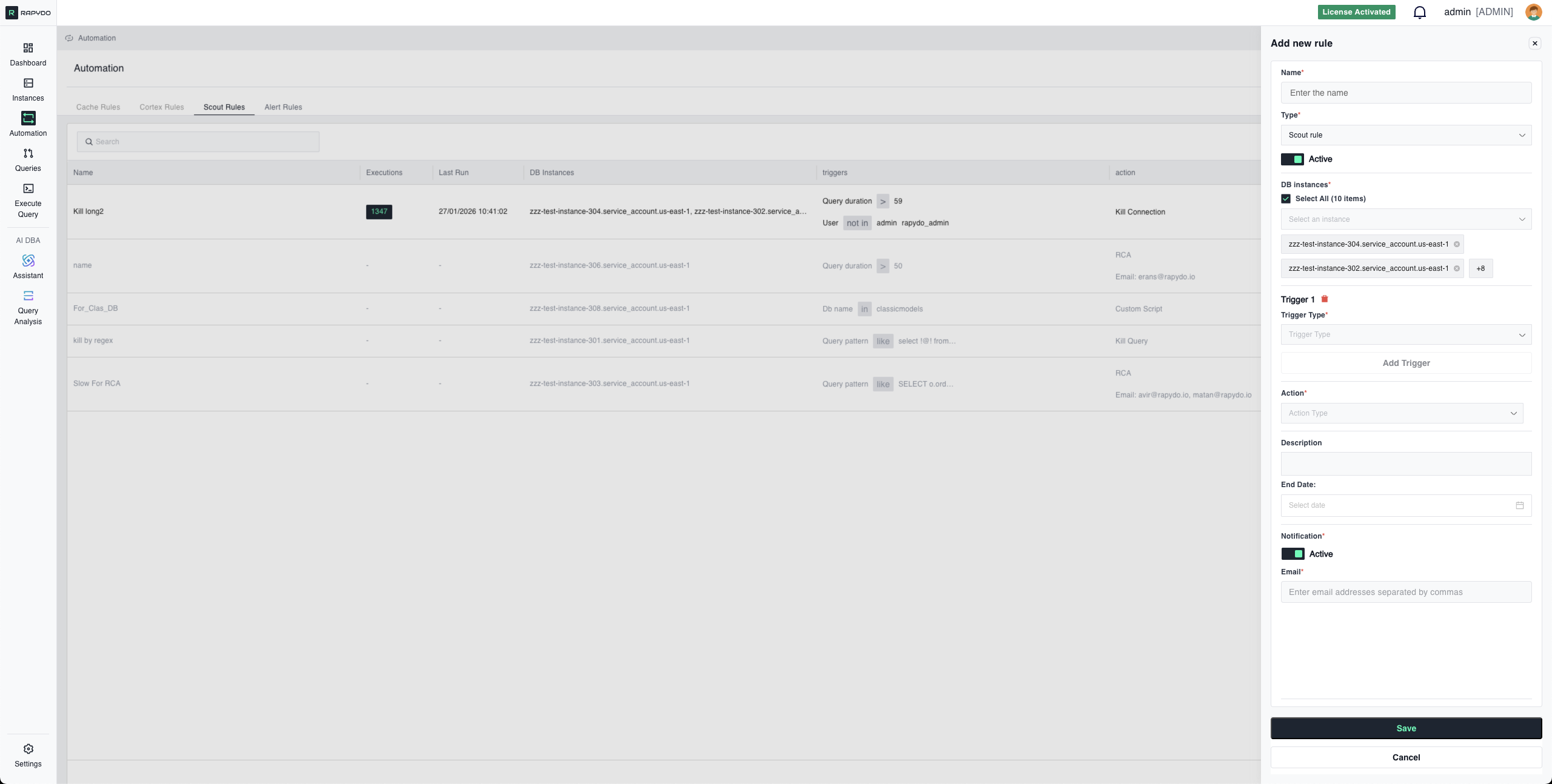 Sends an alert via email or webhook without taking any database action. Queries continue running unaffected.
**How to configure it in the UI:**
Select **No action** as the action type, then enable notifications and enter your email or webhook destination. This combination monitors and alerts without intervening.
**How It Works:**
* Rule monitors for trigger conditions
* When conditions are met, notification is sent
* No queries are killed, no connections terminated
* Event is logged in Rapydo for audit
**Use When:**
* Testing rules before enabling aggressive actions
* Gathering data to understand query patterns
* Building baseline metrics before setting kill thresholds
* You want awareness without automatic intervention
* Monitoring for compliance/audit purposes
**Example Scenario:**
```
Trigger: Query pattern LIKE "%DELETE FROM users%"
Action: No action
Notification: Active
Email: security-team@company.com
Result: Team is alerted to potentially dangerous query,
but no action is taken on the query (allows investigation)
```
***
## **4. Notifications**
**Toggle:** Active/Inactive
**Notification Method:** Choose how to receive alerts:
* **Email**: Enter one or more email addresses (comma-separated)
* **Webhook**: Enter a webhook URL to receive POST notifications
**When Notifications Are Sent:**
* Rule triggers and action is executed
* Notification includes:
* Trigger conditions that were met
* Action that was taken
* Query details (SQL text, duration, user, database)
* Instance information
* Timestamp
**Use With:**
* Any action type (Kill Query, Kill Connection, Query Analysis, etc.)
* Particularly useful with **No action** for monitoring without intervention
***
## Multiple Trigger Logic (AND Relationship)
When you configure multiple triggers (up to 3), **ALL triggers must be true simultaneously** for the rule to activate.
**How AND Logic Works:**
Each trigger is evaluated independently:
* ✅ If ALL triggers are true → Rule activates, action executes
* ❌ If ANY trigger is false → Rule does not activate
***
### **Example 1: Targeted Query Kill**
**Configuration:**
```
Trigger 1: Query duration > 300 seconds
Trigger 2: User In "reporting_user, analytics_user"
Trigger 3: DB name In "production_db"
Action: Kill query
```
**Result:** Only kills queries that are:
* ✅ Running longer than 5 minutes **AND**
* ✅ From reporting or analytics users **AND**
* ✅ On production database **at the same time**
If a query from "reporting\_user" runs for 400 seconds on "dev\_db", it will NOT be killed (DB name doesn't match).
***
### **Example 2: Idle Connection Cleanup**
**Configuration:**
```
Trigger 1: Connection idle time > 600 seconds
Trigger 2: User In "test_user, dev_user"
Trigger 3: IP In "192.168.1.0/24"
Action: Kill connection
```
**Result:** Only kills connections that are:
* ✅ Idle for over 10 minutes **AND**
* ✅ From test or dev users **AND**
* ✅ From the specified IP range **simultaneously**
***
### **Example 3: Pattern-Based Monitoring**
**Configuration:**
```
Trigger 1: Query pattern LIKE "%DROP TABLE%"
Trigger 2: User NOT In "admin, dba"
Trigger 3: DB name In "production_db"
Action: Kill query
Notification: Active
```
**Result:** Only triggers for queries that:
* ✅ Attempt to DROP TABLE **AND**
* ✅ Are NOT from admin/dba users **AND**
* ✅ Target production database **all at once**
***
### **Why Use Multiple Triggers?**
**Precision Targeting:**
* Avoid killing legitimate queries by being specific
* Example: Kill long queries, but only from specific users
**Reduced False Positives:**
* Multiple conditions create high-confidence rules
* Example: Kill idle connections, but only when from external IPs
**Workload-Specific Rules:**
* Different thresholds for different users/databases
* Example: 30-second limit for app users, 300-second limit for analysts
***
### **Best Practices:**
✅ **Start with 1-2 triggers** and add more as you understand your workload
✅ **Test each trigger independently** before combining
✅ **Use NOT In operators** to exclude legitimate traffic
✅ **Combine duration + user + database** for surgical precision
❌ **Don't over-specify** - Too many triggers might never match reality
***
## Configuration Examples
### Example 1: Kill Long-Running Queries (Simple)
**Scenario:** Stop queries that run too long
**Configuration:**
```
DB Instances: Select All
Trigger 1: Query duration > 300 seconds
Action: Kill query
Notification: Active
Email: dba-team@company.com
```
**Result:** Any query running longer than 5 minutes is killed, team is notified
***
### Example 2: Cleanup Idle Connections (Multi-Trigger)
**Scenario:** Free resources from abandoned development connections
**Configuration:**
```
DB Instances: dev-db-01, test-db-01
Trigger 1: Connection idle time > 1800 seconds
Trigger 2: User In "dev_user, test_user, qa_user"
Action: Kill connection
Notification: Active
Email: dev-team@company.com
```
**Result:** Dev/test/QA connections idle for 30+ minutes are closed
***
### Example 3: Rate Limit Reporting User
**Scenario:** Prevent reporting user from monopolizing connections
**Configuration:**
```
DB Instances: production-db-01
Trigger 1: User In "reporting_user"
Action: Rate limit to 5 connections
Notification: Active
Email: ops-team@company.com
```
**Result:** Reporting user limited to max 5 concurrent connections
***
### Example 4: Kill Dangerous Query Patterns
**Scenario:** Terminate destructive operations from non-admin users
**Configuration:**
```
DB Instances: Select All
Trigger 1: Query pattern LIKE "%DROP TABLE%"
Trigger 2: User NOT In "admin, dba, root"
Action: Kill query
Notification: Active
Email: security-team@company.com
```
**Result:** DROP TABLE attempts from non-admins are killed and reported
***
### Example 5: Analyze Slow Analytics Queries
**Scenario:** Build optimization knowledge base for analytics workload
**Configuration:**
```
DB Instances: analytics-db-01
Trigger 1: Query duration > 60 seconds
Trigger 2: User In "analytics_user"
Trigger 3: DB name In "analytics_db"
Action: Query Analysis (RCA)
Notification: Active
Email: dba-team@company.com
```
**Result:** Slow analytics queries are analyzed, remediation plans emailed to DBAs
***
## Execution Logs
Sends an alert via email or webhook without taking any database action. Queries continue running unaffected.
**How to configure it in the UI:**
Select **No action** as the action type, then enable notifications and enter your email or webhook destination. This combination monitors and alerts without intervening.
**How It Works:**
* Rule monitors for trigger conditions
* When conditions are met, notification is sent
* No queries are killed, no connections terminated
* Event is logged in Rapydo for audit
**Use When:**
* Testing rules before enabling aggressive actions
* Gathering data to understand query patterns
* Building baseline metrics before setting kill thresholds
* You want awareness without automatic intervention
* Monitoring for compliance/audit purposes
**Example Scenario:**
```
Trigger: Query pattern LIKE "%DELETE FROM users%"
Action: No action
Notification: Active
Email: security-team@company.com
Result: Team is alerted to potentially dangerous query,
but no action is taken on the query (allows investigation)
```
***
## **4. Notifications**
**Toggle:** Active/Inactive
**Notification Method:** Choose how to receive alerts:
* **Email**: Enter one or more email addresses (comma-separated)
* **Webhook**: Enter a webhook URL to receive POST notifications
**When Notifications Are Sent:**
* Rule triggers and action is executed
* Notification includes:
* Trigger conditions that were met
* Action that was taken
* Query details (SQL text, duration, user, database)
* Instance information
* Timestamp
**Use With:**
* Any action type (Kill Query, Kill Connection, Query Analysis, etc.)
* Particularly useful with **No action** for monitoring without intervention
***
## Multiple Trigger Logic (AND Relationship)
When you configure multiple triggers (up to 3), **ALL triggers must be true simultaneously** for the rule to activate.
**How AND Logic Works:**
Each trigger is evaluated independently:
* ✅ If ALL triggers are true → Rule activates, action executes
* ❌ If ANY trigger is false → Rule does not activate
***
### **Example 1: Targeted Query Kill**
**Configuration:**
```
Trigger 1: Query duration > 300 seconds
Trigger 2: User In "reporting_user, analytics_user"
Trigger 3: DB name In "production_db"
Action: Kill query
```
**Result:** Only kills queries that are:
* ✅ Running longer than 5 minutes **AND**
* ✅ From reporting or analytics users **AND**
* ✅ On production database **at the same time**
If a query from "reporting\_user" runs for 400 seconds on "dev\_db", it will NOT be killed (DB name doesn't match).
***
### **Example 2: Idle Connection Cleanup**
**Configuration:**
```
Trigger 1: Connection idle time > 600 seconds
Trigger 2: User In "test_user, dev_user"
Trigger 3: IP In "192.168.1.0/24"
Action: Kill connection
```
**Result:** Only kills connections that are:
* ✅ Idle for over 10 minutes **AND**
* ✅ From test or dev users **AND**
* ✅ From the specified IP range **simultaneously**
***
### **Example 3: Pattern-Based Monitoring**
**Configuration:**
```
Trigger 1: Query pattern LIKE "%DROP TABLE%"
Trigger 2: User NOT In "admin, dba"
Trigger 3: DB name In "production_db"
Action: Kill query
Notification: Active
```
**Result:** Only triggers for queries that:
* ✅ Attempt to DROP TABLE **AND**
* ✅ Are NOT from admin/dba users **AND**
* ✅ Target production database **all at once**
***
### **Why Use Multiple Triggers?**
**Precision Targeting:**
* Avoid killing legitimate queries by being specific
* Example: Kill long queries, but only from specific users
**Reduced False Positives:**
* Multiple conditions create high-confidence rules
* Example: Kill idle connections, but only when from external IPs
**Workload-Specific Rules:**
* Different thresholds for different users/databases
* Example: 30-second limit for app users, 300-second limit for analysts
***
### **Best Practices:**
✅ **Start with 1-2 triggers** and add more as you understand your workload
✅ **Test each trigger independently** before combining
✅ **Use NOT In operators** to exclude legitimate traffic
✅ **Combine duration + user + database** for surgical precision
❌ **Don't over-specify** - Too many triggers might never match reality
***
## Configuration Examples
### Example 1: Kill Long-Running Queries (Simple)
**Scenario:** Stop queries that run too long
**Configuration:**
```
DB Instances: Select All
Trigger 1: Query duration > 300 seconds
Action: Kill query
Notification: Active
Email: dba-team@company.com
```
**Result:** Any query running longer than 5 minutes is killed, team is notified
***
### Example 2: Cleanup Idle Connections (Multi-Trigger)
**Scenario:** Free resources from abandoned development connections
**Configuration:**
```
DB Instances: dev-db-01, test-db-01
Trigger 1: Connection idle time > 1800 seconds
Trigger 2: User In "dev_user, test_user, qa_user"
Action: Kill connection
Notification: Active
Email: dev-team@company.com
```
**Result:** Dev/test/QA connections idle for 30+ minutes are closed
***
### Example 3: Rate Limit Reporting User
**Scenario:** Prevent reporting user from monopolizing connections
**Configuration:**
```
DB Instances: production-db-01
Trigger 1: User In "reporting_user"
Action: Rate limit to 5 connections
Notification: Active
Email: ops-team@company.com
```
**Result:** Reporting user limited to max 5 concurrent connections
***
### Example 4: Kill Dangerous Query Patterns
**Scenario:** Terminate destructive operations from non-admin users
**Configuration:**
```
DB Instances: Select All
Trigger 1: Query pattern LIKE "%DROP TABLE%"
Trigger 2: User NOT In "admin, dba, root"
Action: Kill query
Notification: Active
Email: security-team@company.com
```
**Result:** DROP TABLE attempts from non-admins are killed and reported
***
### Example 5: Analyze Slow Analytics Queries
**Scenario:** Build optimization knowledge base for analytics workload
**Configuration:**
```
DB Instances: analytics-db-01
Trigger 1: Query duration > 60 seconds
Trigger 2: User In "analytics_user"
Trigger 3: DB name In "analytics_db"
Action: Query Analysis (RCA)
Notification: Active
Email: dba-team@company.com
```
**Result:** Slow analytics queries are analyzed, remediation plans emailed to DBAs
***
## Execution Logs
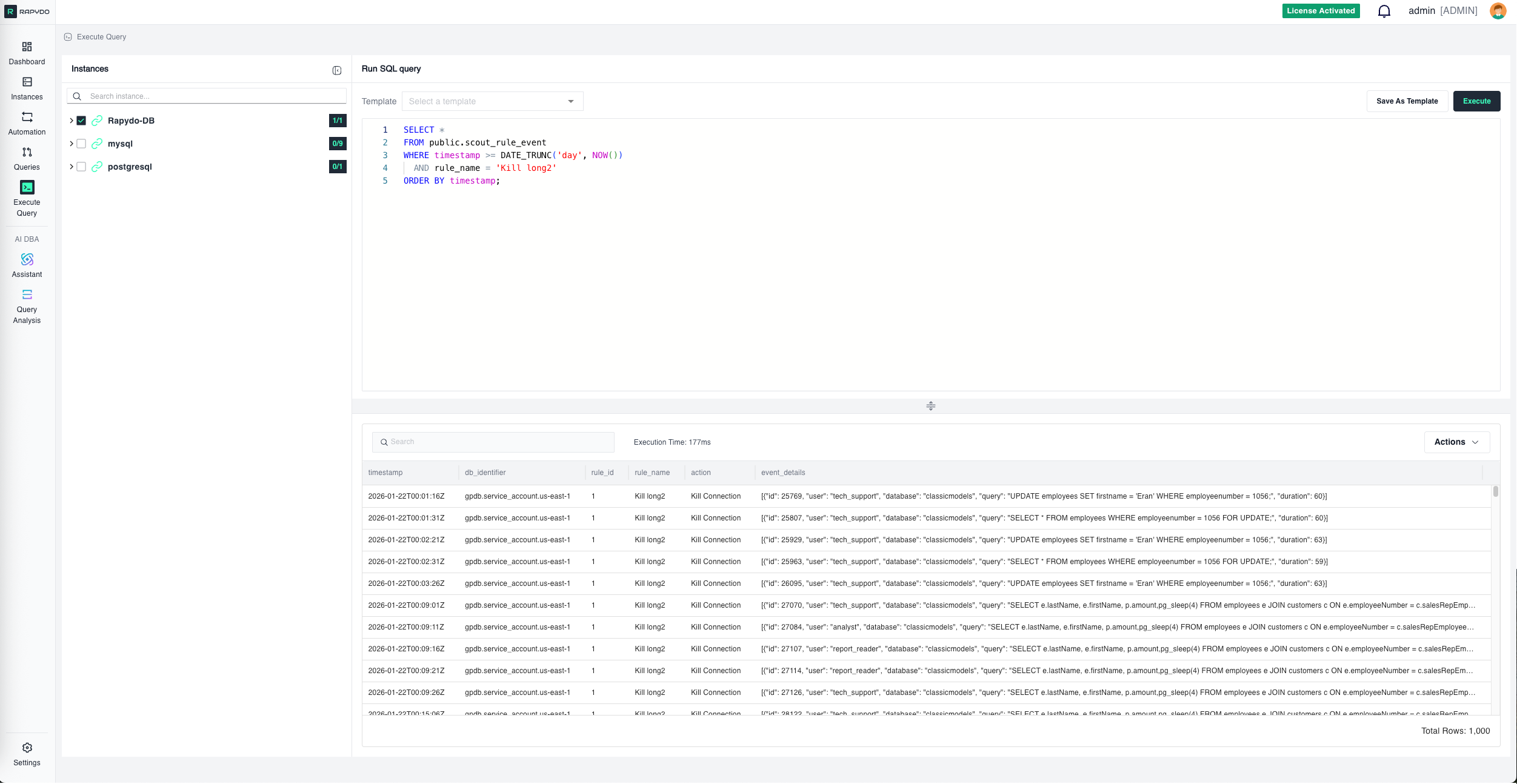 The Execution Logs panel shows a history of all rule activations — when each rule fired, which query triggered it, and what action was taken. Use this to verify rules are working correctly and to review past interventions.
***
## Best Practices
✅ **Start with No action + notification** before enabling kill actions—understand query patterns first
✅ **Use Query Pattern carefully** - Copy exact formatting from real queries, not from documentation
✅ **Test rules in non-production** before deploying to critical databases
✅ **Combine triggers with AND logic** to avoid killing legitimate queries
✅ **Set appropriate thresholds** based on actual workload, not arbitrary numbers
✅ **Enable notifications** to maintain visibility even with automatic actions
✅ **Review killed query logs** regularly to ensure rules aren't too aggressive
***
## Troubleshooting
### Rule Not Triggering
**Check:**
* All triggers are being met simultaneously (remember AND logic)
* Query pattern formatting matches exactly (spacing, line breaks)
* Selected DB instances include the databases where queries are running
* User/DB name/IP filters are not too restrictive
* Rule status is Active, not Disabled
***
### Query Pattern Not Matching
**Solutions:**
* Copy query directly from Rapydo Query Workspace or query logs
* Don't manually type or reformat—preserve exact spacing
* Use `%` wildcards for values that change (dates, IDs, amounts)
* Test pattern against real query text before deploying
* Remember: case-insensitive but spacing-sensitive
***
### Too Many Queries Being Killed
**Solutions:**
* Add more specific triggers (user, database, IP)
* Increase duration thresholds
* Use NOT In operators to exclude legitimate traffic
* Switch to **No action** + notification to monitor before killing
* Review killed query logs to identify patterns
***
### Rate Limit Not Working
**Check:**
* Trigger correctly identifies the connections to limit
* Rate limit value is appropriate for workload
* Connections are actually matching all trigger criteria
* Multiple users aren't being lumped together unintentionally
***
## What's Next?
* [Defining Rules](/automation/defining_rules) - Step-by-step guide to creating rules
* [Alert Rules Reference](/automation/alerts_triggers_and_actions) - Complete Alert Rules documentation
* [Automation Overview](/automation/introduction) - Return to automation overview
The Execution Logs panel shows a history of all rule activations — when each rule fired, which query triggered it, and what action was taken. Use this to verify rules are working correctly and to review past interventions.
***
## Best Practices
✅ **Start with No action + notification** before enabling kill actions—understand query patterns first
✅ **Use Query Pattern carefully** - Copy exact formatting from real queries, not from documentation
✅ **Test rules in non-production** before deploying to critical databases
✅ **Combine triggers with AND logic** to avoid killing legitimate queries
✅ **Set appropriate thresholds** based on actual workload, not arbitrary numbers
✅ **Enable notifications** to maintain visibility even with automatic actions
✅ **Review killed query logs** regularly to ensure rules aren't too aggressive
***
## Troubleshooting
### Rule Not Triggering
**Check:**
* All triggers are being met simultaneously (remember AND logic)
* Query pattern formatting matches exactly (spacing, line breaks)
* Selected DB instances include the databases where queries are running
* User/DB name/IP filters are not too restrictive
* Rule status is Active, not Disabled
***
### Query Pattern Not Matching
**Solutions:**
* Copy query directly from Rapydo Query Workspace or query logs
* Don't manually type or reformat—preserve exact spacing
* Use `%` wildcards for values that change (dates, IDs, amounts)
* Test pattern against real query text before deploying
* Remember: case-insensitive but spacing-sensitive
***
### Too Many Queries Being Killed
**Solutions:**
* Add more specific triggers (user, database, IP)
* Increase duration thresholds
* Use NOT In operators to exclude legitimate traffic
* Switch to **No action** + notification to monitor before killing
* Review killed query logs to identify patterns
***
### Rate Limit Not Working
**Check:**
* Trigger correctly identifies the connections to limit
* Rate limit value is appropriate for workload
* Connections are actually matching all trigger criteria
* Multiple users aren't being lumped together unintentionally
***
## What's Next?
* [Defining Rules](/automation/defining_rules) - Step-by-step guide to creating rules
* [Alert Rules Reference](/automation/alerts_triggers_and_actions) - Complete Alert Rules documentation
* [Automation Overview](/automation/introduction) - Return to automation overview